Virtual environments
Why use virtual environments
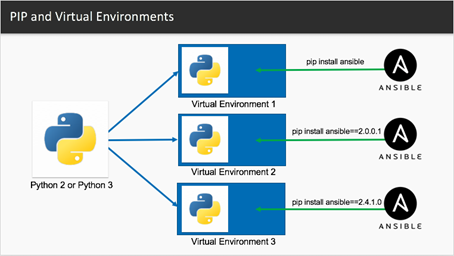
- A virtual environment is a self-contained folder with its own Python interpreter and libraries. It is already part of Python.
- Helps keep different projects isolated and organized.
- Avoids conflicts between project dependencies.
- Easily replicate environments across machines using
requirements.txtorpyproject.tomlfiles. - Test and run different projects using different versions of the same package.
- Try out new packages or upgrades without affecting global Python.
- Keeps your system environment clean and uncluttered.
How to use virtual environments
Create a virtual environment
Activate a virtual environment
Windows:
Mac/Linux:
Now you're "inside" the environment.
Install packages into the virtual environment
It is good practice to make sure pip is up to date first:
Now you can install packages into the environment, for example:
Deactivate a virtual environment
When you are done or need to switch to a different project, use the following command to exit the virtual environment: