Serialized population file
To model a population with endemic disease, you cannot use a common modeling technique in which you introduce a disease outbreak to a naive population and analyze the immediate aftermath. Doing so would create a population missing the levels of natural immunity built up in the population due to the history of exposure to the pathogen. Instead, you must run the simulation for a period of time until the disease dynamics reach an equilibrium (aside from stochastic noise). This is known as steady state. The simulation output prior to that point is disregarded. This is a modeling concept known as simulation burn-in, borrowed from the electronics industry where the first items produced by a manufacturing process are discarded before the process is applied.
However, the time necessary to run simulations until this point can be significant, especially for large populations. Indeed, for endemic disease present at low absolute prevalence, you should simulate a larger population size that allows a small number of infected individuals to be represented.
EMOD avoids the need to run the burn-in period again and again with each simulation by using serialization to save the population state after it reaches equilibrium. Then, when you want to begin a subsequent simulation investigating the outcome of a particular set of interventions, you can begin the simulation at that point rather than needing to re-run the burn-in period. You can serialize the population at multiple time steps during a simulation.
The serialized population files created are placed in the output directory and use the naming
convention state-
Note
If you used repeating interventions during the burn-in period, those interventions will not continue based on the information in the serialized population file. Check your campaign file for repeating interventions and reconfigure them as needed for the period after burn-in.
Not every type of intervention can be serialized. Please see Individual interventions and Node interventions for information on which interventions can be serialized.
See Setup configuration parameters for more information on configuration. See software-serializing-pops for more information on utilizing serialized populations in your simulations.
File format
A serialized population file is a sequence of independently compressed chunks written in a fixed order. The file is not a single JSON tree — the simulation, nodes, and human agents are stored in separate chunks so that each can be loaded and freed independently, keeping peak memory usage low.
The following figure gives an overview of the chunk layout.
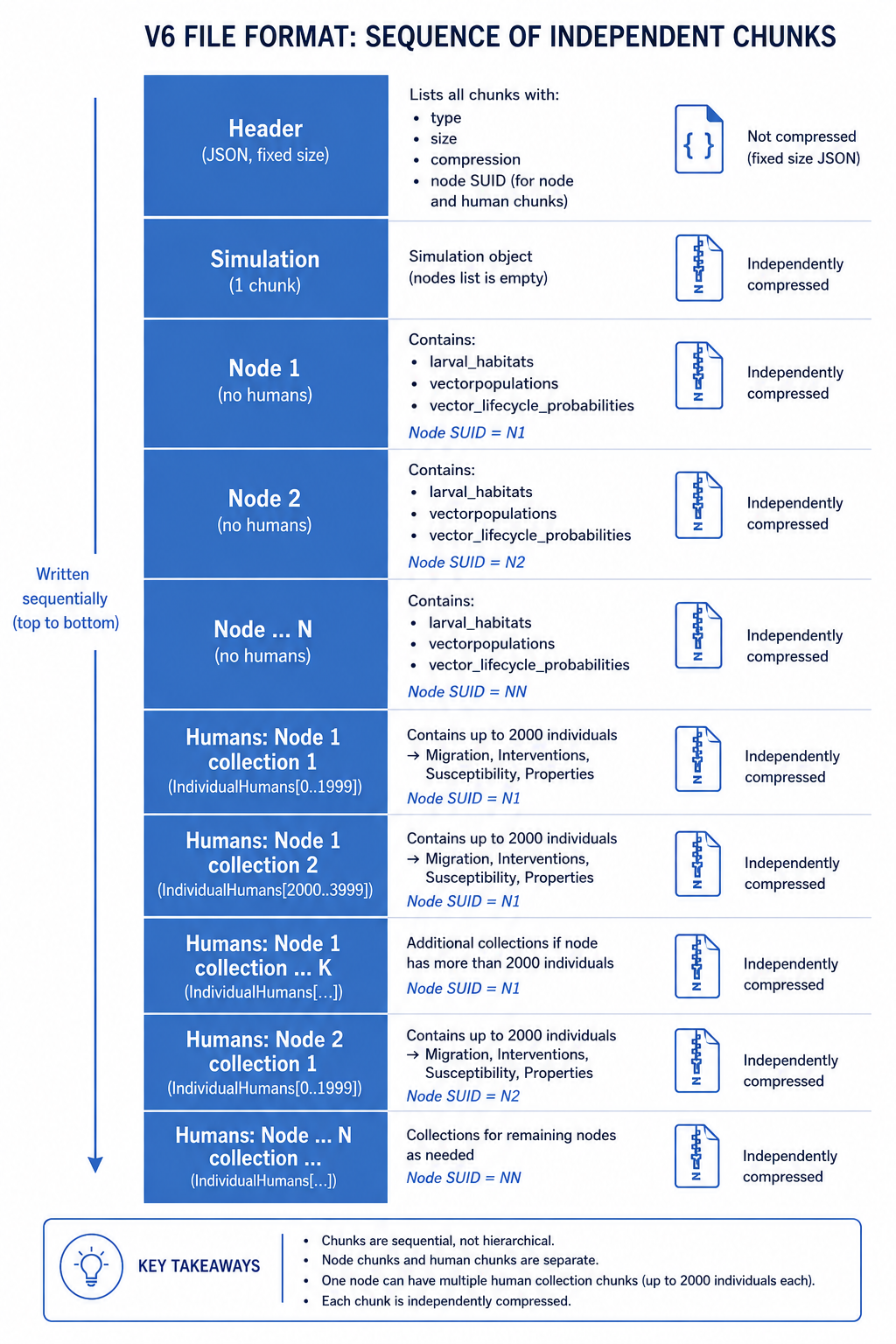
The chunks appear in this order on disk:
- Simulation chunk (one) — the simulation object with an empty node list.
- Node chunks (one per node) — each node’s non-human data: larval habitats, vector populations, and vector lifecycle probabilities. Individual humans are not stored here.
- Human collection chunks (one or more per node) — each chunk holds up to Serialization_Max_Humans_Per_Collection (default 2000) individuals and is tagged in the header with the SUID of the node they belong to. Each individual carries its own Migration, Interventions, Susceptibility, and Properties. A node with a large population produces multiple human collection chunks.
Each chunk is compressed independently using LZ4, SNAPPY, or no compression, chosen automatically based on the size of the data. Different chunks in the same file may use different compression schemes.
Internal state
The structure of a serialized population file reflects the internal state of the objects used in the simulation. At the configured timestep, the simulation serializes the simulation object, then each node (without its humans), then the human agents in collections. Each object calls the serialize method of its members in turn — an individual, for instance, serializes its infections, interventions, susceptibility, and properties. This continues until there are no more objects.
All objects that are instantiated from classes that inherit from ISerializable and implement the ISerializable interface can write themselves to a buffer. A JSON writer adds variable names and formatting so that a valid JSON chunk is generated. A similar mechanism is at play when a simulation is loaded from a file — the names of variables and their values are used to re-instantiate the same objects. Because EMOD is written in a compiled language, the description of data and objects (classes and variable types) in the source code must match the data types in the serialized population file exactly — for example, if a variable is of type integer, changing its value to a float in the source will not have the anticipated effect.
Multi-core
If the simulation is run on several cores, each core saves one file at the configured timestep(s). To continue the simulation one EMOD file must be defined per node.
File Name
The format for single core is: state-timestep.dtk e.g. state-00100.dtk
The format for multi-core is: state-timestep-core.dtk e.g. state-00100-001.dtk
Header
Each file begins with a 4-byte magic number (IDTK), followed by a 12-character decimal field
giving the header size in bytes, followed by the header JSON. The header size is fixed based on the
number of nodes and human collections, which allows the header to be overwritten with final chunk
sizes after the chunks are written.
The current header format (version 6) contains the following fields:
| Parameter | Example | Type | Description |
|---|---|---|---|
| version | 6 | Integer | File format version number |
| author | IDM | String | Author of the file |
| tool | DTK | String | Tool used to create the file |
| date | Mon Jan 01 00:00:00 2025 | String | Date and time the file was created |
| emod_info | {} | Object | EMOD version information |
| sim_compression | LZ4 | NON, LZ4, SNA | Compression used for the simulation chunk |
| sim_chunk_size | 000000000012AB34 | Hex string | Size in bytes of the simulation chunk |
| node_suids | ["00000001", "00000002"] | Array of hex strings | SUID for each node chunk |
| node_compressions | ["LZ4", "LZ4"] | Array of NON/LZ4/SNA | Compression for each node chunk |
| node_chunk_sizes | ["000000000012AB34", ...] | Array of hex strings | Size in bytes of each node chunk |
| human_node_suids | ["00000001", "00000001", "00000002"] | Array of hex strings | Node SUID for each human collection chunk |
| human_compressions | ["LZ4", "LZ4", "LZ4"] | Array of NON/LZ4/SNA | Compression for each human collection chunk |
| human_num_humans | ["000007D0", "000003E8", "000007D0"] | Array of hex strings | Number of humans in each collection chunk |
| human_chunk_sizes | ["000000000012AB34", ...] | Array of hex strings | Size in bytes of each human collection chunk |