Tutorial 2: Reports
This tutorial builds on Tutorial 1 by adding additional reports beyond InsetChart, configuring report filtering, and plotting different report types.
File: tutorials/tutorial_2_reports.py
Adding reports
A build_reports() callback configures reporters and is passed to EMODTask.from_defaults()
via report_builder=. The callback receives a Reporters object, adds reporter instances to
it, and returns it.
def build_reports(reporters):
    from emodpy_malaria.reporters.reporters import (MalariaSummaryReport, DemographicsReport,
                                                     InsetChart, ReportVectorStats)
    from emodpy.reporters.base import ReportFilter

    reporters.add(MalariaSummaryReport(
        reporters,
        reporting_interval=30,
        age_bins=[0.25, 5, 115],
        max_number_reports=sim_years * 13,
        pretty_format=True,
        report_filter=ReportFilter(start_day=1, end_day=sim_years * 365)
    ))

    reporters.add(InsetChart(reporters))
    reporters.add(DemographicsReport(reporters))
    reporters.add(ReportVectorStats(reporters, stratify_by_species=True))

    return reporters
Four reports are added:
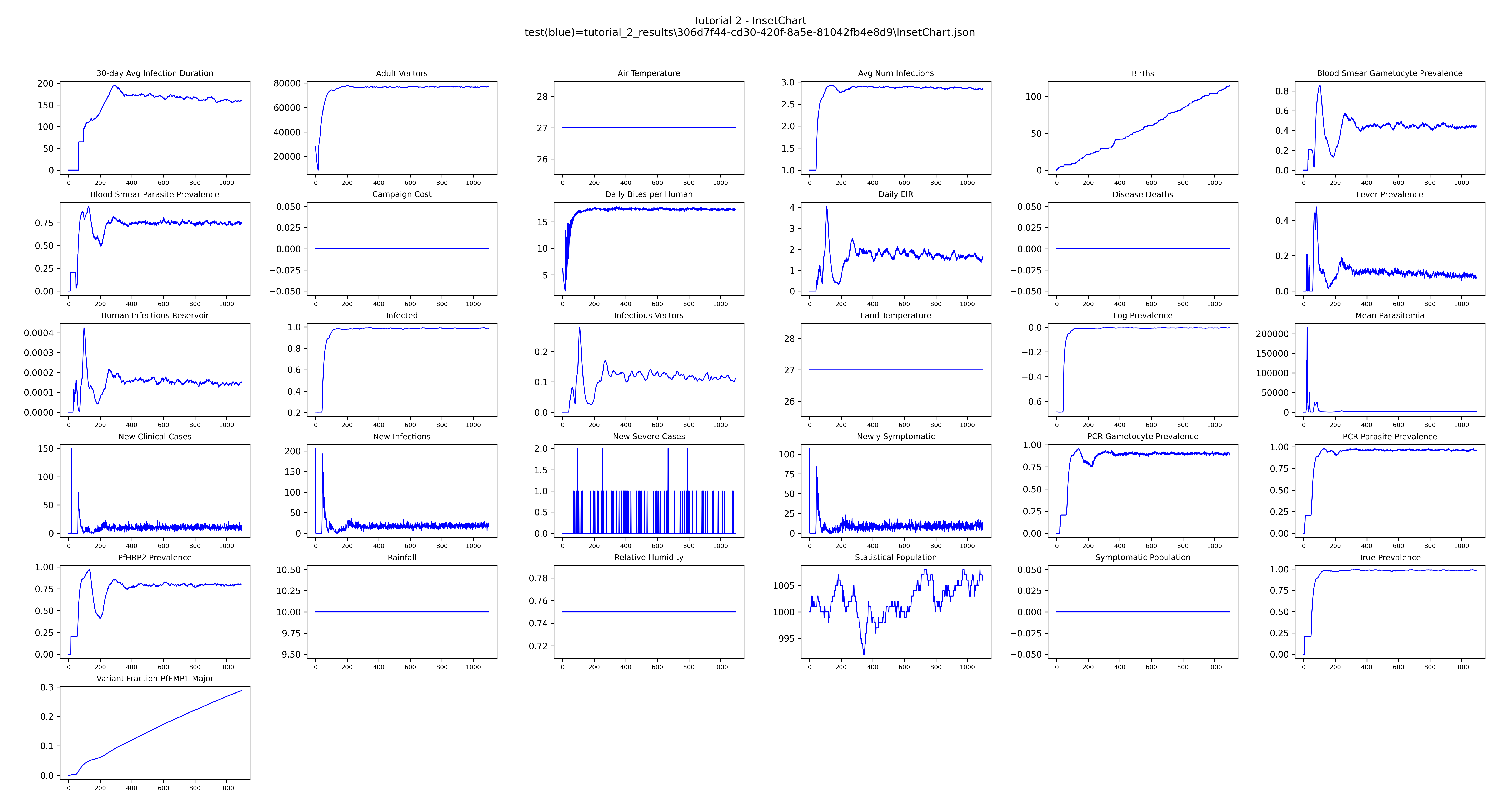
- InsetChart — simulation-wide averages per time step across channels like population
size, infection prevalence, daily biting rate, and many other statistics. Produces
InsetChart.json. - MalariaSummaryReport — age-stratified malaria metrics (PfPR, clinical incidence,
population) grouped by reporting interval and age bin.
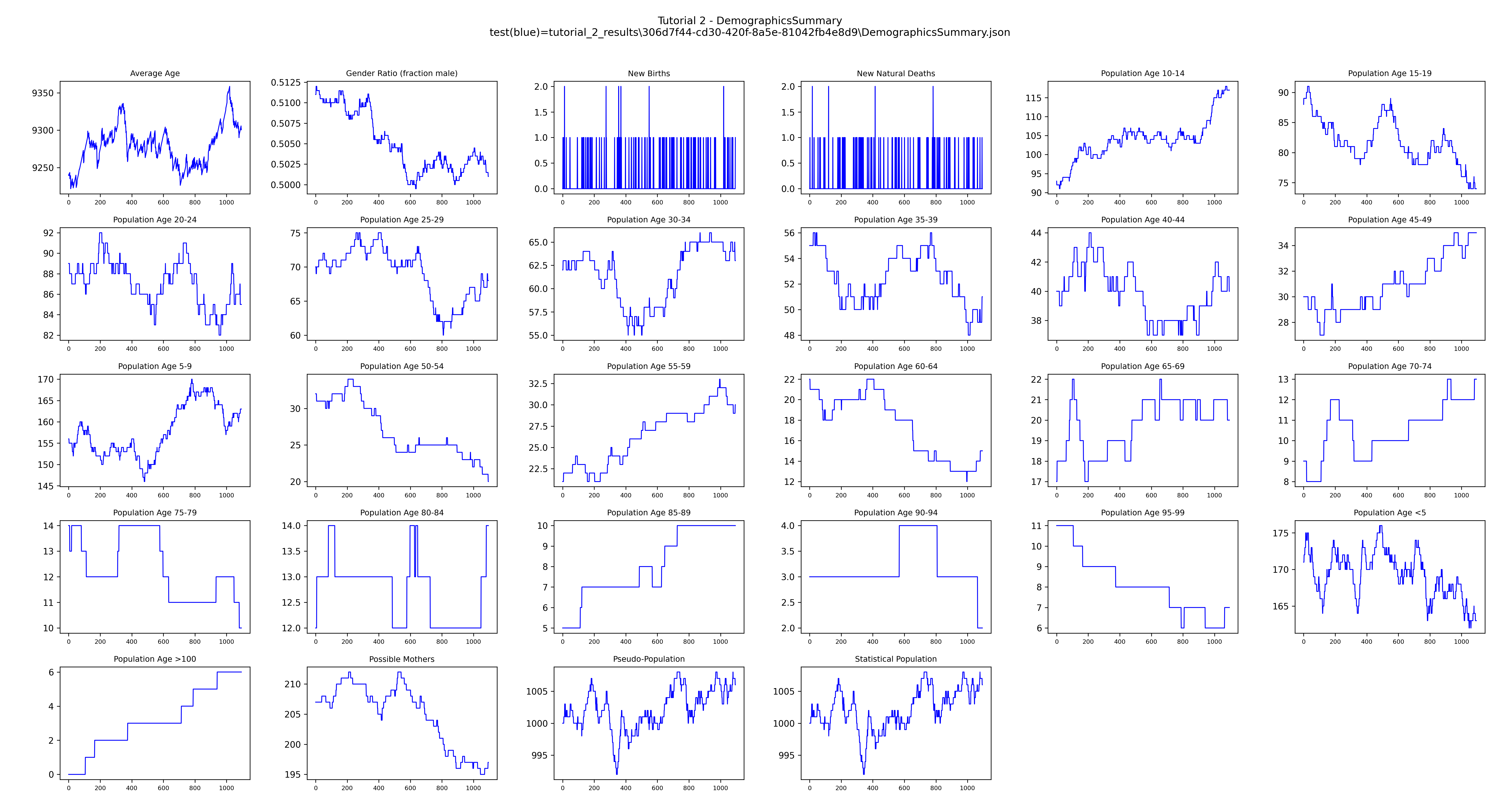
ReportFiltercontrols the time window for data collection. - DemographicsReport — population and vital dynamics over time, producing
DemographicsSummary.jsonandBinnedReport.json. - ReportVectorStats — CSV report with detailed vector life-cycle data per time step,
including population counts by state (adult, infected, infectious, larva, egg),
indoor/outdoor biting counts, and habitat statistics. Setting
stratify_by_species=Trueadds aSpeciescolumn so you can track each vector species independently.
The callback is passed to EMODTask.from_defaults():
Downloading results
After the experiment completes, DownloadAnalyzer copies specific output files from each
simulation into a local directory. This works the same way regardless of platform — Container,
COMPS, or SLURM.
filenames = [
    "output/InsetChart.json",
    "output/DemographicsSummary.json",
    "output/MalariaSummaryReport_monthly.json",
    "output/ReportVectorStats.csv",
]
analyzers = [DownloadAnalyzer(filenames=filenames, output_path=output_path)]

manager = AnalyzeManager(platform=platform, analyzers=analyzers)
manager.add_item(experiment)
manager.analyze()
The download only runs when experiment.succeeded is true. After it completes,
tutorial_2_results/ contains one subdirectory per simulation, named by its unique ID:
tutorial_2_results/
  551dfe56-f2f8-4831-9f15-b7c0ac529557/
    InsetChart.json
    DemographicsSummary.json
    MalariaSummaryReport_monthly.json
    ReportVectorStats.csv
Plotting results
plot_inset_chart() reads all InsetChart.json files found under output_path and overlays
them on the same axes — one line per simulation — giving a quick overview of every channel over
time.
DemographicsSummary.json has the same channel report format as InsetChart.json and can be
plotted the same way. get_filenames() locates the downloaded files by prefix:
demog_files = get_filenames(dir_or_filename=output_path,
                            file_prefix="DemographicsSummary",
                            file_extension="json")
if demog_files:
    plot_inset_chart(comparison1=demog_files[0],
                     title="Tutorial 2 - DemographicsSummary",
                     output=output_path)
The resulting images are saved to tutorial_2_results/.
Example output
Next
Tutorial 3 adds a campaign file with treatment-seeking care and ITNs, and compares scenarios with and without interventions.