Tutorial 5: Parameter sweeps
A parameter sweep runs the same scenario across a range of input values so you can study how outcomes change with each parameter. This tutorial sweeps over treatment-seeking coverage to show how different levels of case management affect malaria burden in a seasonal setting.
File: tutorials/tutorial_5_sweep.py
SimulationBuilder
SimulationBuilder creates multiple simulations by combining sweep definitions. Each sweep
definition is a callback function paired with a list of values — the builder calls the
function once per value per simulation.
Adding two sweep definitions produces a cross-product: every combination of treatment_coverage and
Run_Number gets its own simulation. With 3 coverage values and 3 random seeds that is 9
simulations total:
builder = SimulationBuilder()
builder.add_sweep_definition(update_campaign, [0.3, 0.6, 0.9])
builder.add_sweep_definition(sweep_run_number, [0, 1, 2])
Sweeping campaign parameters
Coverage is now a parameter rather than a constant. update_campaign() is the sweep callback
that rebuilds the campaign for each simulation with the assigned coverage value:
def update_campaign(simulation, treatment_coverage):
    build_campaign_partial = partial(build_campaign, treatment_coverage=treatment_coverage)
    simulation.task.create_campaign_from_callback(build_campaign_partial)
    return {"treatment_coverage": treatment_coverage}
partial() binds treatment_coverage to build_campaign so the resulting function takes no arguments,
which is what create_campaign_from_callback() expects. The dict returned becomes a tag on
the simulation — used below to group results by coverage value.
build_campaign() accepts treatment_coverage as a parameter and applies it to both clinical
and severe case targets via demographic_coverage in TargetDemographicsConfig:
def build_campaign(campaign, treatment_coverage=0.8):
    campaign.set_schema(manifest.schema_path)

    clinical_drug = AntimalarialDrug(campaign, drug_type="Artemether")
    add_intervention_triggered(
        campaign,
        intervention_list=[clinical_drug],
        triggers_list=["NewClinicalCase"],
        start_day=60,
        target_demographics_config=TargetDemographicsConfig(
            demographic_coverage=treatment_coverage)
    )

    severe_drug = [AntimalarialDrug(campaign, drug_type="Chloroquine"),
                   AntimalarialDrug(campaign, drug_type="Lumefantrine")]
    add_intervention_triggered(
        campaign,
        intervention_list=severe_drug,
        triggers_list=["NewSevereCase"],
        start_day=40,
        target_demographics_config=TargetDemographicsConfig(
            demographic_coverage=min(treatment_coverage + 0.2, 1.0),
            target_age_max=40)
    )
demographic_coverage controls what fraction of the target population receives the
intervention. target_age_max=40 restricts severe case treatment to people 40 years and
younger. ITN coverage remains fixed at 0.5 — only treatment-seeking coverage is swept.
Grouping results by coverage
After downloading, group_by_coverage() reads the treatment_coverage tag from each simulation in
the experiment object and moves its downloaded directory into a subdirectory named by coverage
value:
def group_by_coverage(experiment, output_path):
    for sim in experiment.simulations:
        coverage = sim.tags.get("treatment_coverage")
        sim_dir = os.path.join(output_path, str(sim.id))
        label = f"treatment_coverage_{coverage}"
        target_dir = os.path.join(output_path, label)
        os.makedirs(target_dir, exist_ok=True)
        shutil.move(sim_dir, os.path.join(target_dir, str(sim.id)))
Reading tags from the experiment object works on all platforms — Container, COMPS, and SLURM.
After grouping, tutorial_5_results/ contains one subdirectory per coverage value:
tutorial_5_results/
  treatment_coverage_0.3/
    {sim_id}/InsetChart.json   ← Run_Number 0
    {sim_id}/InsetChart.json   ← Run_Number 1
    {sim_id}/InsetChart.json   ← Run_Number 2
  treatment_coverage_0.6/
    ...
  treatment_coverage_0.9/
    ...
Plotting by coverage group
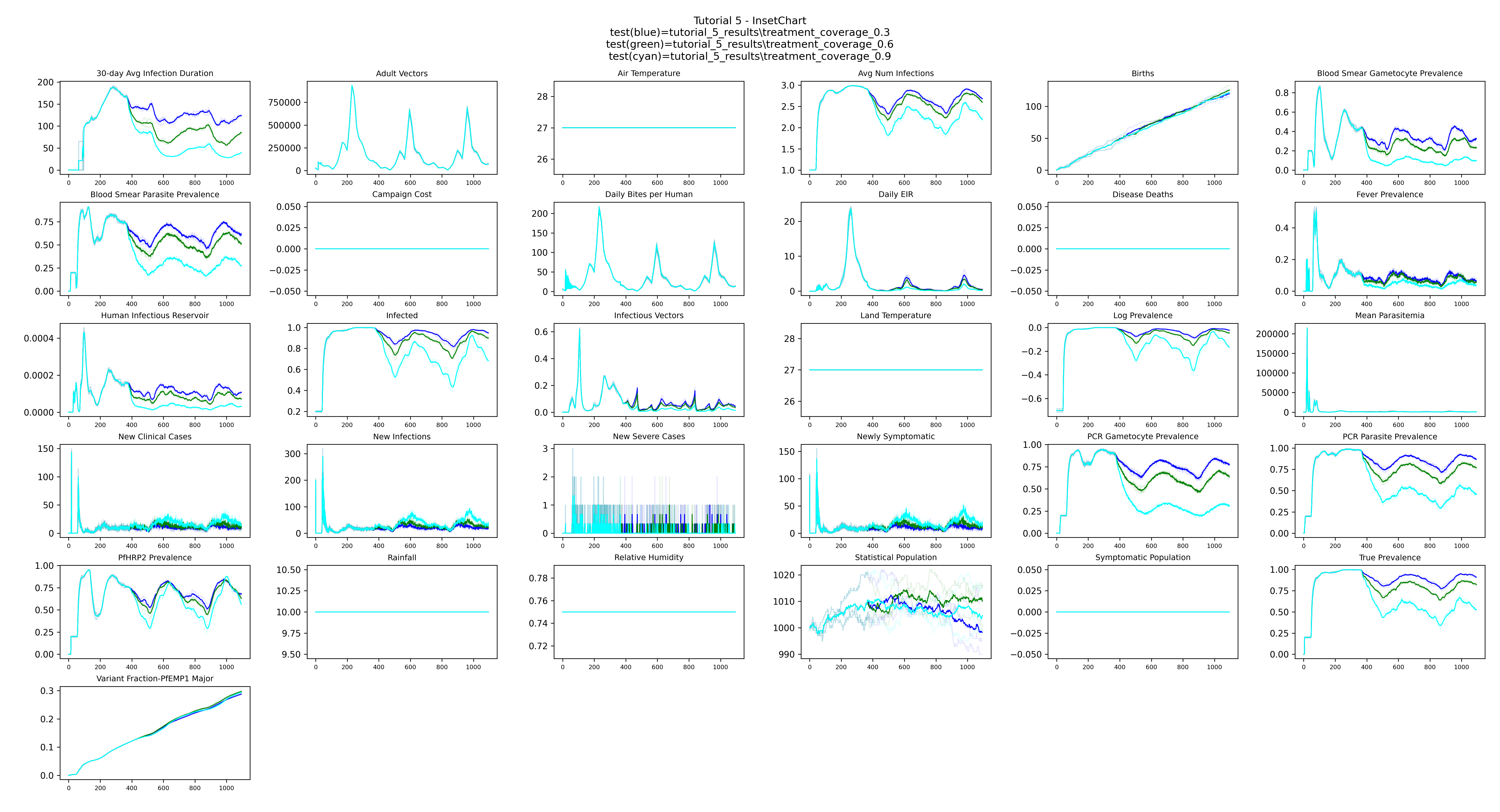
plot_mean() takes one directory per coverage group and uses the directory name as the legend
label. show_raw_data=True overlays the individual simulation lines in a lighter color so
the stochastic spread within each group is visible alongside the mean:
from emodpy_malaria.plotting.plot_inset_chart_mean_compare import plot_mean

plot_mean(dir1=dirs[0],
          dir2=dirs[1],
          dir3=dirs[2],
          title="Tutorial 5 - InsetChart",
          show_raw_data=True,
          output=output_path)
Example output
The plot shows one bold mean line per coverage group (treatment_coverage_0.3, treatment_coverage_0.6, treatment_coverage_0.9), with the
three individual stochastic runs shown in a lighter color behind each mean. With higher
coverage, there are fewer infected people (Infected channel) and each infection resolves more
quickly (30-day Avg Infection Duration). Together, fewer infected people spending less time
infected means mosquitoes have less opportunity to acquire infection from humans — resulting
in fewer infectious vectors and a lower Daily EIR.
Next
Tutorial 6 introduces calibration with CalibManager, fitting
x_Temporary_Larval_Habitat to match a reference PfPR target.