EMOD input files
Every EMOD simulation is driven by a set of input files. Understanding what each file controls will help you follow the tutorial scripts.
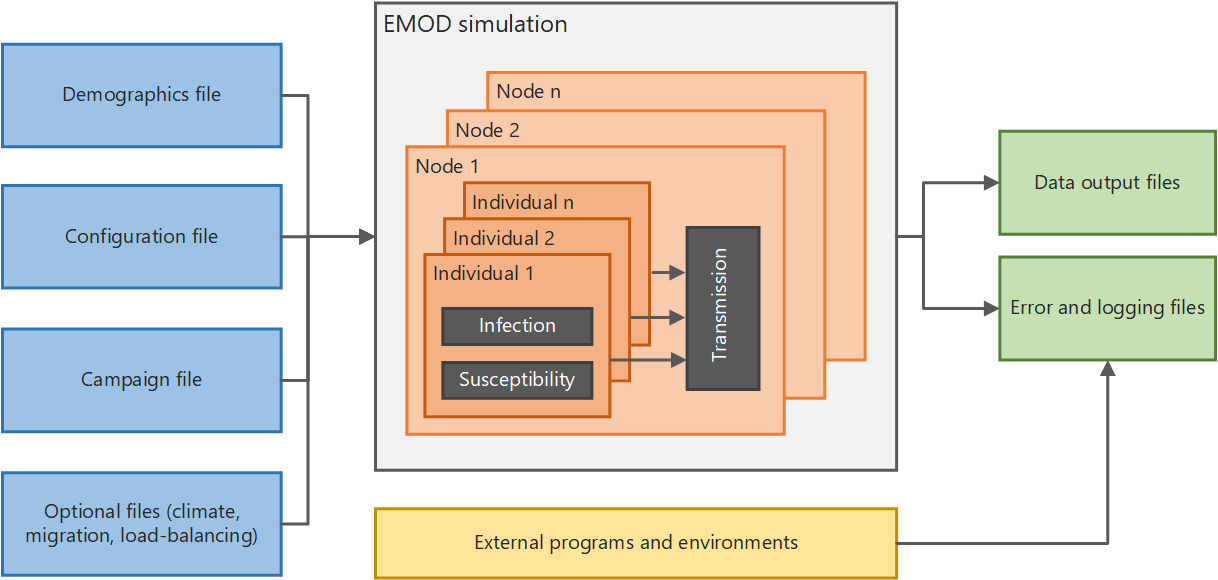
Configuration file
config.json contains the simulation-wide settings: how long to run, which disease model to
use, transmission parameters, and hundreds of other options. In the tutorials, build_config()
is the callback that builds this file. The built-in country models provide a pre-validated
configuration for the modeled country that you can then modify.
Demographics file
The demographics file describes the human population: initial population size, age and sex
structure, mortality, fertility, and relationship formation parameters. In the tutorials,
build_demographics() builds this file. The built-in country models provide demographics
calibrated to a specific country's epidemic.
Campaign file
The campaign file defines interventions — what to deploy, to whom, and when. Each intervention
event specifies a trigger, a target population, and an intervention class such as ART
initiation, voluntary medical male circumcision (VMMC), or condom distribution. In the
tutorials, build_campaign() builds this file. The built-in country models include a default
cascade of care that can be customized or replaced.
Reports and output files
Reports are configured in the script before the experiment runs. They tell EMOD what to
measure and at what frequency — for example, annual HIV prevalence by age and sex, or new
infections per timestep. EMOD writes each report's results to an output file in the
output/ subdirectory of each simulation. InsetChart.json is a time-series summary of key
channels that must be explicitly enabled before it is produced. Additional reports can be
added to the task via add_reports(). Tutorial 2 introduces reports and shows how to download
and plot the output files.