Output settings
The following parameters configure whether or not output reports are created for the simulation, such as reports detailing spatial or demographic data at each time step. By default, the InsetChart is always created.
The following figures are examples for the parameter Report_HIV_Period.
When Report_HIV_Period is set to a value that is less than the Simulation_Timestep, a record will be written during the next time step after the reported period. More than one period may occur before the next time step.
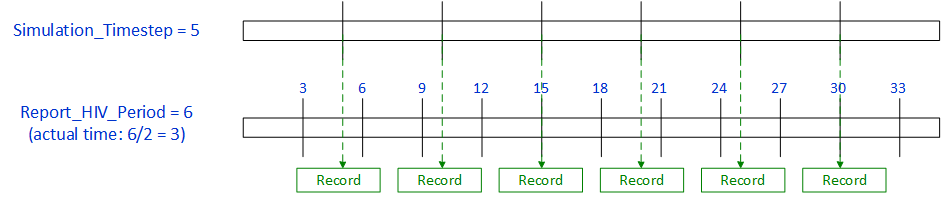
When Report_HIV_Period is greater than Simulation_Timestep, a record will be written during the next time step after the period occurs. This means that a record may not be written at all time steps.

Note
Parameters are case-sensitive. For Boolean parameters, set to 1 for true or 0 for false. Minimum, maximum, or default values of "NA" indicate that those values are not applicable for that parameter.
EMOD does not use true defaults; that is, if the dependency relationships indicate that a parameter is required, you must supply a value for it. However, many of the tools used to work with EMOD will use the default values provided below.
JSON format does not permit comments, but you can add "dummy" parameters to add contextual information to your files. Any keys that are not EMOD parameter names will be ignored by the model.
| Parameter | Type | Min | Max | Default | Description |
|---|---|---|---|---|---|
| Custom_Coordinator_Events | array of strings | NA | NA | [] | The list of valid, user-defined Coordinator Events that will be included in the campaign. These are specifically events which apply with EventCoordinators, such completing distribution of a collection of interventions. Any event used in the campaign must be in this list. See example. |
| Custom_Individual_Events | array of strings | NA | NA | [] | The list of valid, user-defined Individual Events that will be included in the campaign. These are specifically events which apply at an individual level, such as receiving a vaccine. Any individual event used in the campaign must either be one of the built-in events or in this list. See Event list for a list of all possible built-in events. See example. |
| Custom_Node_Events | array of strings | NA | NA | [] | The list of valid, user-defined Node Events that will be included in the campaign. These are specifically events which apply at the node/location level, such as finishing using an EnvironmentalDiagnostic. Any event used in the campaign must be in this list. See example. |
| Custom_Reports_Filename | string | NA | NA | "" | The name of the file containing custom report configuration parameters. Omitting this parameter or setting it to RunAllCustomReports will load all reporters found that are valid for the given simulation type. The file must be in JSON format. |
| Enable_Default_Reporting | boolean | 0 | 1 | 1 | Controls whether or not the default InsetChart.json report is created. |
| Enable_Demographics_Reporting | boolean | 0 | 1 | 1 | Controls whether or not demographic summary data and age-binned reports are outputted to file. |
| Enable_Property_Output | boolean | 0 | 1 | 0 | Controls whether or not to create property output reports, which detail groups as defined in IndividualProperties in the demographics file (see IndividualProperties parameters). When there is more than one property type, the report will display the channel information for all combinations of the property type groups. |
| Enable_Spatial_Output | boolean | 0 | 1 | 0 | Controls whether or not spatial output reports are created. If set to true (1), spatial output reports include all channels listed in the parameter Spatial_Output_Channels. .. note:: Spatial output files require significant processing time and disk space. |
| Report_Coital_Acts | boolean | 0 | 1 | 0 | Set to true (1) to enable or to false (0) to disable the RelationshipConsummatedReport.csv output report. |
| Report_Coordinator_Event_Recorder | boolean | 0 | 1 | 0 | Enables or disables the ReportCoordinatorEventRecorder.csv output report for coordinator events. When enabled (set to 1) reports will be generated for the broadcasted valid coordinator events, as specified in Report_Coordinator_Event_Recorder_Events. |
| Report_Coordinator_Event_Recorder_Events | array of strings | NA | NA | [] | The list of events to include or exclude in the ReportCoordinatorEventRecorder.csv output report, based on how Report_Coordinator_Event_Recorder_Ignore_Events_In_List is set. This list must not be empty and is dependent upon Report_Coordinator_Event_Recorder being enabled. In addition, the events must be defined in Customer_Coordinator_Events. See example. |
| Report_Coordinator_Event_Recorder_Ignore_Events_In_List | boolean | 0 | 1 | 0 | If set to false (0), only the events listed in the Report_Coordinator_Event_Recorder_Events array will be included in the ReportCoordinatorEventRecorder.csv output report. If set to true (1), only the events listed in the array will be excluded, and all other events will be included. If you want to return all events from the simulation, leave the events array empty. |
| Report_Event_Recorder | boolean | 0 | 1 | 0 | Set to 1 to generate the report. |
| Report_Event_Recorder_End_Day | float | 0 | 3.40282e+38 | 3.40282e+38 | The day of the simulation to stop collecting data. |
| Report_Event_Recorder_Events | array of strings | NA | NA | [] | The list of events to include or exclude in the ReportEventRecorder.csv output report, based on how Report_Event_Recorder_Ignore_Events_In_List is set. See Event list for a list of all possible built-in events. Custom_Individual_Events may also be included. Warning: If the list is empty and Report_Event_Recorder_Ignore_Events_In_List is set to 0, no events will be returned. See example. |
| Report_Event_Recorder_Ignore_Events_In_List | boolean | 0 | 1 | 0 | If set to false (0), only the events listed in Report_Event_Recorder_Events will be included in the output report. If set to true (1), only the events listed in Report_Event_Recorder_Events will be excluded, and all other events will be included. To return all events from the simulation, set this value to 1 and leave the Report_Event_Recorder_Events array empty. |
| Report_Event_Recorder_Individual_Properties | array of strings | NA | NA | [] | An array of optional individual property (IP) keys to be added to the report. One column will be added for each IP Key listed, indicating the individual's value for that IP Key at the time of the event. See IndividualProperties and NodeProperties for details on setting individual properties. See example. |
| Report_Event_Recorder_Max_Age_Years | float | 0 | 9.3228e+35 | 9.3228e+35 | Maximum age in years of people to collect data on. |
| Report_Event_Recorder_Min_Age_Years | float | 0 | 9.3228e+35 | 0 | Minimum age in years of people to collect data on. |
| Report_Event_Recorder_Must_Have_Intervention | string | NA | NA | "" | The name of the intervention that the individual must have in order to be included in the report. Leave the string empty (default value) to not include interventions in the selection criteria. See Individual interventions for more information. |
| Report_Event_Recorder_Must_Have_IP_Key_Value | string | NA | NA | "" | An individual property (IP) Key:Value pair that an individual must have in order to be included in the report. Leave the string empty (default value) to not include IPs in the selection criteria. See IndividualProperties and NodeProperties for more information. |
| Report_Event_Recorder_Node_IDs_Of_Interest | array of integers | 0 | 2.14748e+09 | [] | Data will be collected for the nodes in this list. Leave the array empty (default value) to collect data on all nodes. See example. |
| Report_Event_Recorder_PropertyChange_IP_Key_Of_Interest | string | NA | NA | "" | If the string is not empty, then the recorder will add the PropertyChange event to the list of events that the report is listening to. However, it will only record the events where the property changed the value of the given key. |
| Report_Event_Recorder_Start_Day | float | 0 | 3.40282e+38 | 0 | The day of the simulation to start collecting data. |
| Report_Event_Recorder_Start_Year | float | 1900 | 2200 | 1900 | The simulation time in calendar years to start collecting data (January 1st of the specified year). For HIV simulations, use this instead of Report_Event_Recorder_Start_Day. |
| Report_Event_Recorder_End_Year | float | 1900 | 2200 | 2200 | The simulation time in calendar years to stop collecting data (January 1st of the specified year). For HIV simulations, use this instead of Report_Event_Recorder_End_Day. |
| Report_HIV_ART | boolean | 0 | 1 | 0 | Set to true (1) to enable or to false (0) to disable the ReportHIVART.csv output report. |
| Report_HIV_ByAgeAndGender | boolean | 0 | 1 | 0 | Set to 1 to generate the report. |
| Report_HIV_ByAgeAndGender_Add_Concordant_Relationships | boolean | 0 | 1 | 0 | When set to 1, a Concordant column for each relationship type (TRANSITORY, INFORMAL, MARITAL, and COMMERCIAL) is included in the output report. These contain totals for each relationship of each type where both partners have the same HIV status. |
| Report_HIV_ByAgeAndGender_Use_Old_Format | boolean | NA | NA | 0 | When set to 1, enables a legacy data collection behavior where data collection is offset by one time step: the first entry includes an extra time step and subsequent entries occur at half the Report_HIV_Period but remain offset. This is superseded functionality that exists only for backward compatibility with analyses built on the old behavior; it should not be used for new work. When set to 0 (default), data is collected as expected — every half of the Report_HIV_Period with no offset. |
| Report_HIV_ByAgeAndGender_Add_Relationships | boolean | 0 | 1 | 0 | When set to 1, the report will contain data on the population currently in a relationship and ever in a relationship for each relationship type (TRANSITORY, INFORMAL, MARITAL, and COMMERCIAL), eight columns total. Additionally, columns containing a sum of individuals in two or more partnerships (Has Concurrent Partners) and a sum of the lifetime number of relationships (Lifetime Partners) will be included. |
| Report_HIV_ByAgeAndGender_Add_Transmitters | boolean | 0 | 1 | 0 | When set to 1, the Transmitters column is included in the output report. For a given row, this value indicates how many individuals that have transmitted the disease meet the specifications of that row. |
| Report_HIV_ByAgeAndGender_Collect_Age_Bins_Data | array of floats | -3.40282e+38 | 3.40282e+38 | [] | A list of bins used to stratify the report by age. Each value defines the minimum value (inclusive) of that bin, while the next value defines the maximum value (exclusive) of the bin. The values cannot be equal and must be listed in ascending order. Leave the array empty to not stratify the report by age. The maximum number of age bins is 100. See example. |
| Report_HIV_ByAgeAndGender_Collect_Circumcision_Data | boolean | 0 | 1 | 0 | When set to 1, the ReportHIVByAgeAndGender.csv output report will have separate rows for those who do or do not have the MaleCircumcision intervention and an additional column with 0 and 1 indicating whether the row corresponds to those who are or are not circumcised. Setting this to 1 doubles the number of rows in ReportHIVByAgeAndGender.csv. |
| Report_HIV_ByAgeAndGender_Collect_Gender_Data | boolean | 0 | 1 | 0 | When set to 1, the output report will be stratified by gender. |
| Report_HIV_ByAgeAndGender_Collect_HIV_Data | boolean | 0 | 1 | 0 | When set to 1, the HasHIV column is included in the output report. The report data will stratified by those who do or do not have HIV. Cannot be used with Report_HIV_ByAgeAndGender_Collect_HIV_Stage_Data. Note: setting this to 1 doubles the number of rows in the output report. |
| Report_HIV_ByAgeAndGender_Collect_HIV_Stage_Data | boolean | 0 | 1 | 0 | When set to 1, the HIV_Stage column is included in the output report. The report data will be stratified by HIV Infection Stage (NOT_INFECTED, ACUTE, LATENT, AIDS, ON_ART). Cannot be used with Report_HIV_ByAgeAndGender_Collect_HIV_Data or Report_HIV_ByAgeAndGender_Collect_On_Art_Data. |
| Report_HIV_ByAgeAndGender_Collect_Intervention_Data | array of strings | NA | NA | [] | A list of interventions used to stratify the report. This allows for reporting on a subset (or all) of the interventions that an individual has been on, of those listed in the Intervention_Name campaign parameter. Note: this can only be used with interventions that remain with an individual for a period of time, such as VMMC, vaccine/PrEP, or those with a delay state in the cascade of care. See Individual interventions for a list of possible interventions. See example. |
| Report_HIV_ByAgeAndGender_Collect_Targeting_Config_Data | array of JSON objects | NA | NA | [] | Stratifies the population by adding a column of 0s and 1s indicating whether each individual qualifies based on the Targeting_Config class specified. There will be one column (MeetsTargetingConfig_X) for each entry in the array. The order of the targeting configs in the array determines the order of the columns in the report. See Targeting_Config classes for possible values. |
| Report_HIV_ByAgeAndGender_Collect_IP_Data | array of strings | NA | NA | [] | A list of individual property (IP) keys used to stratify the report. A column will be added to the report for each IP listed. Specify the IP values by adding an IndividualProperties parameter in the demographics file. See IndividualProperties and NodeProperties for details on setting individual properties. Note: each IP key included here will also increase the number of rows in the report by several fold (once for each possible IP Key:Value pair). |
| Report_HIV_ByAgeAndGender_Collect_On_Art_Data | boolean | 0 | 1 | 0 | When set to 1, the On_Art_Dim column is included in the output report. The report data will be stratified by those individuals who are on ART and those who are not. Cannot be used with Report_HIV_ByAgeAndGender_Collect_HIV_Stage_Data. Note: setting this to 1 doubles the number of rows in the output report. |
| Report_HIV_ByAgeAndGender_Event_Counter_List | array of strings | NA | NA | [] | A list of events used to stratify the report. A column will be added to the report for each event listed, showing the number of times the event occurred during the reporting period. To be counted, the individual must qualify for the row stratification at the time the event occurred, not necessarily at the end of the reporting period. See Event list for possible event values. See example. |
| Report_HIV_ByAgeAndGender_Has_Intervention_With_Name | string | NA | NA | "" | This parameter is being deprecated. Use Report_HIV_ByAgeAndGender_Collect_Intervention_Data instead. If an intervention is listed for this parameter, one column will be added to the report, indicating how many individuals in the row have the intervention. See Individual interventions for possible intervention values. Note: this only works for interventions that remain with an individual for a period of time, such as VMMC, vaccine/PrEP, or those with a delay state in the cascade of care. |
| Report_HIV_ByAgeAndGender_Start_Year | float | 1900 | 2200 | 1900 | The simulation time in years to start collecting data. |
| Report_HIV_ByAgeAndGender_Stop_Year | float | 1900 | 2200 | 2200 | The simulation time in years to stop collecting data. |
| Report_HIV_ByAgeAndGender_Stratify_Infected_By_CD4 | boolean | 0 | 1 | 0 | When set to 1, the number of infected individuals will be segregated into four columns based on CD4 count. When set to 0, the number of infected individuals are aggregated into one column regardless of CD4 count. Note: this creates additional polling columns, not more stratification rows. |
| Report_HIV_Event_Channels_List | array of strings | NA | NA | [] | This is the list of events included in the InsetChart report. If events are specified with this parameter, the InsetChart will include a channel for each event listed. If no events are listed, a "Number of Events" channel will display the total number of all events that occurred during the simulation. See example. |
| Report_HIV_Infection | boolean | 0 | 1 | 0 | Enables or disables the ReportHIVInfection.csv output report. |
| Report_HIV_Infection_Start_Year | float | 1900 | 2200 | 1900 | The beginning calendar year that will be collected by the ReportHIVInfection.csv output report. Report_HIV_Infection must be set to 1. |
| Report_HIV_Infection_Stop_Year | float | 1900 | 2200 | 2200 | The ending calendar year that will be collected by the ReportHIVInfection.csv output report. Report_HIV_Infection must be set to 1. |
| Report_HIV_Mortality | boolean | 0 | 1 | 0 | Enables or disables the HIVMortality.csv (disease and non-disease deaths) output report. |
| Report_HIV_Period | float | 30 | 36500 | 730 | The number of days between records in the HIV_By_Age_And_Gender output report. Output data will only be recorded during a time step, so if Report_HIV_Period is set to a value less than the value set for Simulation_Timestep, more than one period may occur before the next time step. When Report_HIV_Period is greater than the value set for Simulation_Timestep, a record may not be written during each time step. Note that the number of days between records is half the time specified by this parameter. For example, if Report_HIV_Period is set to 40, the actual time between records is 20 days. For best results, use integers for this value. |
| Report_Node_Event_Recorder | boolean | 0 | 1 | 0 | Enables or disables the ReportNodeEventRecorder.csv output report. When enabled (set to 1) reports will be generated for the broadcasted valid node events, as specified in Report_Node_Event_Recorder_Events. |
| Report_Node_Event_Recorder_Events | array of strings | NA | NA | [] | The list of node events to include or exclude in the ReportNodeEventRecorder.csv output report, based on how Report_Node_Event_Recorder_Ignore_Events_In_List is set. See example. |
| Report_Node_Event_Recorder_Ignore_Events_In_List | boolean | 0 | 1 | 0 | If set to false (0), only the node events listed in the Report_Node_Event_Recorder_Events array will be included in the ReportNodeEventRecorder.csv output report. If set to true (1), only the node events listed in the array will be excluded, and all other node events will be included. If you want to return all node events from the simulation, leave the node events array empty. .. csv-table:: :header: Value, Events array, Output file :widths: 1, 2, 2 0, No events, No events 0, One or more events, Only the listed events. 1, No events, All events occurring in the simulation. 1, One or more events, "All simulation events occurring in the simulation, except for those listed.". |
| Report_Node_Event_Recorder_Node_Properties | array of strings | NA | NA | [] | Specifies an array of (optional) node property keys, as defined in NodeProperties in the demographics file, to be added as additional columns to the ReportNodeEventRecorder.csv output report. See example. |
| Report_Node_Event_Recorder_Stats_By_IPs | array of strings | NA | NA | [] | Specifies an array of (optional) individual property keys, as defined in IndividualProperties in the demographics file, to be added to the ReportNodeEventRecorder.csv output report. For each key:value pair there will be two additional columns (Key:Value:NumIndividuals, Key:Value:NumInfected) added to the report. For example, with a Risk property key assigned the values of LOW and HIGH there would then be four additional columns (Risk:LOW:NumIndividuals, Risk:LOW:NumInfected, Risk:HIGH:NumIndividuals, Risk:HIGH:NumInfected). An empty array equals no additional columns added. See example. |
| Report_Relationship_End | boolean | 0 | 1 | 0 | Enables or disables the RelationshipEnd.csv output report. For HIV simulations, there will be no additional columns. |
| Report_Relationship_Start | boolean | 0 | 1 | 0 | Set this to 1 to generate the report. |
| Report_Relationship_Start_End_Year | float | 1900 | 2200 | 2200 | Simulation time in years to stop collecting data. |
| Report_Relationship_Start_Include_HIV_Disease_Statistics | boolean | 0 | 1 | 1 | When set to 1, the report will include information on CD4 count, viral load, disease stage, HIV positivity, and HIV testing results for each partner in the relationship. |
| Report_Relationship_Start_Include_Other_Relationship_Statistics | boolean | 0 | 1 | 1 | When set to 1, the report will include information on the number of active and lifetime relationships of each type (Transitory, Informal, Marital, and Commercial) for each partner in the relationship, as well as total relationships in the past six month and total lifetime relationships. Additionally, a bitmask column will indicate which types of concurrent relationships are allowed; these are configured using the Concurrency_Configuration parameter in the demographics file—see Demographics parameters for more information. |
| Report_Relationship_Start_Individual_Properties | array of strings | NA | NA | [] | A list of individual property (IP) keys that will be included in the report as applicable to each partner at the start of the relationship. One column will be added to the report for each partner, for each key in the list. Specify the IP keys by adding an IndividualProperties parameter in the demographics file. See IndividualProperties and NodeProperties for details on setting individual properties. See example. |
| Report_Relationship_Start_Max_Age_Years | float | 0 | 9.3228E+35 | 9.3228E+35 | The age that of one of the partners must be less than or equal to for the relationship to be reported. |
| Report_Relationship_Start_Min_Age_Years | float | 0 | 9.3228E+35 | 0 | The age that of one of the partners must be greater than or equal to for the relationship to be reported. |
| Report_Relationship_Start_Must_Have_Intervention | string | NA | NA | "" | The name of an intervention that the one of the partners must have in order for the relationship to be reported. Empty string means don't look at the interventions. For more information, see Individual interventions. |
| Report_Relationship_Start_Must_Have_IP_Key_Value | string | NA | NA | "" | A Key:Value pair that one of the partners must have for the relationship to be reported. Empty string means don't look at individual properties. For more information, see IndividualProperties and NodeProperties. |
| Report_Relationship_Start_Node_IDs_Of_Interest | array of floats | 0 | 2.14748E+09 | [] | Data will be collected for the nodes in this list. See example. |
| Report_Relationship_Start_Start_Year | float | 1900 | 2200 | 1900 | Simulation time in years to start collecting data. |
| Report_Surveillance_Event_Recorder | boolean | 0 | 1 | 0 | Enables or disables the ReportSurveillanceEventRecorder.csv output report. When enabled (set to 1) reports will be generated for the broadcasted valid coordinator events, as specified in Report_Surveillance_Event_Recorder_Events. |
| Report_Surveillance_Event_Recorder_Events | array of strings | NA | NA | [] | The list of events to include or exclude in the ReportSurveillanceEventRecorder.csv output report, based on how Report_Surveillance_Event_Recorder_Ignore_Events_In_List is set. This list must not be empty and is dependent upon Report_Surveillance_Event_Recorder being enabled. See example. |
| Report_Surveillance_Event_Recorder_Ignore_Events_In_List | boolean | 0 | 1 | 0 | If set to false (0), only the events listed in the Report_Surveillance_Event_Recorder_Events array will be included in the ReportSurveillanceEventRecorder.csv output report. If set to true (1), only the events listed in the array will be excluded, and all other events will be included. If you want to return all events from the simulation, leave the events array empty. .. csv-table:: :header: Value, Events array, Output file :widths: 1, 2, 2 0, No events, No events 0, One or more events, Only the listed events. 1, No events, All events occurring in the simulation. 1, One or more events, "All simulation events occurring in the simulation, except for those listed.". |
| Report_Surveillance_Event_Recorder_Stats_By_IPs | array of strings | NA | NA | [] | Specifies an array of (optional) individual property keys, as defined in IndividualProperties in the demographics file, to be added to the ReportSurveillanceEventRecorder.csv output report. For each key:value pair there will be two additional columns (Key:Value:NumIndividuals, Key:Value:NumInfected) added to the report. For example, with a Risk property key assigned the values of LOW and HIGH there would then be four additional columns (Risk:LOW:NumIndividuals, Risk:LOW:NumInfected, Risk:HIGH:NumIndividuals, Risk:HIGH:NumInfected). An empty array equals no additional columns added. See example. |
| Report_Transmission | boolean | 0 | 1 | 0 | Enables or disables the TransmissionReport.csv output report. For HIV simulations, there will be some additional columns. |
| Spatial_Output_Channels | array of strings | NA | NA | [] | An array of channel names for spatial output by node and time step. The data from each channel will be written to a separate binary file. Enable_Spatial_Output must be set to true (1). Possible values are: Air_Temperature Data related to air temperature. Births Data related to the number of births. Campaign_Cost Data related to the costs of a campaign. Disease_Deaths Data related to the number of deaths due to disease. Human_Infectious_Reservoir Data related to the total infectiousness of the population. Infections The fraction of the population currently infected. Land_Temperature Data related to the average land temperature over all nodes. New_Infections Data related to the presence of new infections. New_Reported_Infections Data related to the presence of reported new infections. Population Data related to the total population in the simulation. Prevalence Data related to the fraction of the population that is infected. Rainfall Data related to the presence of rainfall. Relative_Humidity Data related to the presence of relative humidity. See example. |